COMPUTER BACKUP and SECURITY
For Smaller Users
Computer information can be lost or stolen in seconds. Virus software is just one part of good security policies. Backup and encryption are needed from the beginning. Suggestions are given here for ways to handle those tasks.
I suggest using storage that connects to your computer via a USB port. Such devices have programs that will run when you first attach one. Those programs are typically not needed for the operation of the device. They allow the manufacturer to sell you stuff. Stop right here and take a precaution. In Windows 7, left click on the button at lower left (Start), click Control Panel, click view by at the upper right, set it to small icons if it isn't already, click AutoPlay, and set every blessed thing to "Ask me every time" or "Take no action". If you don't, setup programs will cause you problems. For other systems, you can use a search engine to find out how to turn AutoPlay off.
For even a relatively large database, it is possible to backup in minutes to a very small device and carry it to a computer in another building. A USB flash drive, stick memory, thumbdrive, (different names for the same thing) is convenient. Some companies ban them. Although I consider a ban throwing the baby out with the bath water, you do need to take at least some precautions starting with disabling AutoPlay. I realize that in a big company, it is hard to get everyone to be careful. If you are unsure of the precautions or if you are in a company that bans thumbdrives, you could use CD-Rs or DVD-Rs. Thumbdrives are cheap and reusable, but CD-Rs also cost little.
You can copy flash drive data onto another computer at another location in case of catastrophe. It's also nice to keep just a bit of old backup data. Your January data was fine last February, but now in September last January is screwed up. What changed? In QuickBooks and Peachtree, you have an audit trail report IF the history has not been condensed. But if you have a historical backup, it is far easier. You can print reports from an older version and compare them line by line.
A 16Gb thumbdrive is inexpensive and will last for years. I bought my last one for $40 at a large discount store. At the office supply store across the street, the identical product was $80. Note that 5 Gb costs $50/year on Intuit's servers. (See Cloud Storage below).
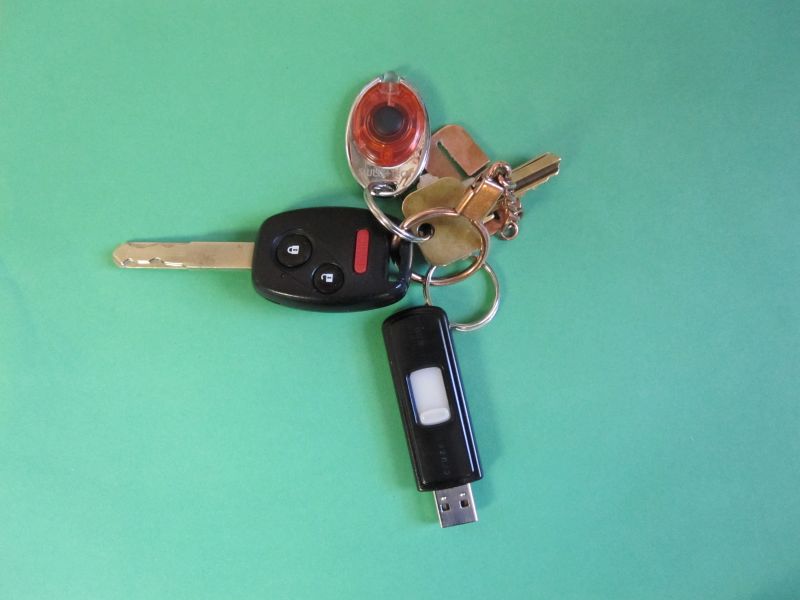
There are two precautions you need to take with flash drives. They attach to your key chain. Indeed, you'd be wise to fasten it securely to your car key so you won't go anywhere without it. But you could still wind up with all of this private data for anyone to find lying in the parking lot. And chances are very good that anyone who finds it will insert it into their computer to see what's on it. You can reduce the danger by encrypting the data. I use TrueCrypt. The price is certainly right, currently zero, and it is easy to use.
A Sandisk 16Gb Cruzer has a tiny post for attachment. Even a small key ring will not go around it. Tie it with fishing line, I guess. I soldered a copper ring around it.
The second precaution leaves me feeling a bit down as it ruins a lot of the potential value of a flash drive. In theory, you should be able to load accounting software and data onto a flash drive, insert it into any computer, and pick up where you left off at your last location. The problem is that if you run ANY program off of a flash drive or any other removable media, you could insert a virus onto the host computer. Note the default even as of Windows 7 is to automatically run an initializing program if one exists every time removable media is inserted. As I mentioned above, this will cause you problems. AutoPlay is best turned off.
When you insert a thumbdrive, you can be extra cautious and scan it for viruses. Malwarebytes is a good free program to do this. Right-click the thumbdrive, and you'll be given a choice to scan it. Kaspersky (not free) offers to scan it. The problem is that an encrypted volume is also hidden from virus-checking software. You have to open it first, and then scan it separately. Kaspersky apparently cannot scan an encrypted Truecrypt volume that has been opened. Bug, I guess.
Online backup or "cloud" storage is readily available. Both Peachtree and QuickBooks will sell you backups onto their servers. QB's currently starts at $5 a month or $50 per year for 5Gb of data. PT includes a basic free backup service. A small office is not likely to get out of the free (100Mb) range. But if you do, the subscription prices are absurd, $50 per year for 2Gb. Dropbox offers that much for free (but requires a download – that's a little too scary for me). I have known two people who trusted companies (but not QB nor PT) to keep backups on their servers only to discover one terrible day the servers were wiped out. And the companies themselves had no backup. The companies claimed they were not liable.
For QuickBooks 2011, it is possible to buy a "Care Protection Plan" for $150/year. Included is 10Gb of cloud storage, and a data recovery service normally $250 (for those unfortunates with hosed ledgers and no backups). I hope I never need that service. Still, I have watched in horror as QuickBooks froze the entire computer during a backup. See Malware Protection below. The Care Protection Plan backup requires a program running in the background. I don't like that idea.
I'd like to think I'm reasonably careful and experienced, yet I got a vicious virus on one of my computers running Windows XP. I wasn't visiting some "naughty" web site, (but not exactly a business site either). I don't watch many videos and had dismissed irritating requests for Flash updates. Well, Flash ran an ad on the side of the screen. It broke, and a Vundo variant went in through a crack. I suddenly started getting ads for "Personal Defender" purporting to be a virus removal tool. It WAS a virus, a kind called "ransomware". I could not boot into safe mode (usually you do that by tapping F8 right after turning the machine on). I could not use system restore nor any of the other tricks. All of those avenues had been blocked.
I put the hard drive on another computer and scanned it with Malwarebytes and PC Tools. That took hours and located 100 instances of malware. When I put the drive back into its original computer, booted up and did a scan, I still had a virus. It was a rootkit – a virus inserted directly into the system where it could be activated upon bootup. I think I still could have removed it using sfc (see below) or ComboFix (freeware). But I became afraid of XP (and Flash, but there is no way to avoid Flash – even Apple is beginning to agree). I just did a reinstall. Everything was backed up elsewhere. Then I upgraded to Windows 7. All that ate up around a week.
Aargh! I suffered another computer-breaker on Windows 7. PC Tools wanted to install a new version. The installation died on a BSOD (blue screen of death). According to other users, that is happening with that version. I got tired of fooling with it. Oops. I was left unprotected. But this time, I had a better way to recover.
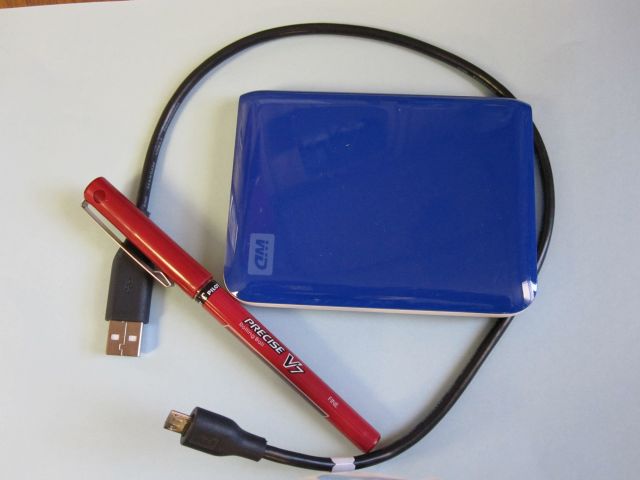
You can get USB hard drives large enough to make images of your computer (the whole thing), and they are almost as convenient as a flash drive. In the US, many cost less than $100 at Wal-Mart. Western Digital makes "Passport" drives that are shirt pocket sized. Recently, 1Tb drives (1000 Gb) Passport drives were on sale for $119.
Should your computer get a bad virus, it can disable safe mode and restore points. Some say you must do a full restore in that case to be sure there are no viruses. Then you get to spend a week reinstalling all the other software, browser favorites, pictures and data. Um, they ARE backed up – right? And you do know where the purchased software packages are?
I argue an image on an "outboard" hard drive is a better hope. Windows 7 can make an image. XP and Vista Home version do not have it built in, but no matter. I'm not using the built in version for very good reasons given below. Instead, I use a free version of Macrium Reflect. It takes about an hour to make an image. In addition to the image, you must make a rescue CD that will restore the image if you need to. Restore was slightly confusing. I had backed up my C: drive, but when I restored, the letter was E:. But the restore CD prevented me from selecting anything else.
Have a backup plan before you even start with an accounting program. And dadgummit, make sure you can actually open that backup on the other computer. This is no time for false security. And yet I still screw up.
I have a Dell computer with Windows 7 64 bit. I had been making image backups all along. The computer began to hang at the Starting Windows and Shutdown screen and running slowly at other times. These symptoms can indicate a virus or a corrupt system file. There is a utility for corrupt Windows system files from XP on. Go to the Command Prompt which is under All Programs / Accessories for Windows 7. Right click, and select Run as Administrator. Type sfc /scannow. Oops. It didn't resolve my problem.
OK. Time to restore from a prior image. At the time, I was still using the built-in image maker. I inserted the recovery disc I had made during the image backup, turned the computer on while tapping F12, selected boot from CD, and after a lengthy boot-up, the recovery system died on an error 0x4001100200001012. I had never actually ensured I could boot from it. This is a recognized error in certain Dells with Windows 7 (mine is a Studio 540) that has not been resolved to date. Fortunately, the recovery disk that came with the computer could also restore from an image. Oops. I had never done that either. It turns out there is no way to get past the password if one is set on a USB hard drive. OK, I had one without a password. Oops. I had renamed some image files. That does not work. They have to be named WindowsImageBackup for the just-barely-get-by limited system on the recovery disk to find them. They cannot be in a subdirectory, and no, you cannot tell the system where to find it. If the system image isn't exactly in the right place, take the USB hard drive to another computer and move the image to where the recovery system can find it. Good grief! Designed with irritation in mind.
So now I use Macrium Reflect.Gotcha after gotcha. True, the system didn't work as described, but most of this was my fault. I did have a backup plan, but I had never actually tried it until it was necessary.
Hopefully, I'll do better in the future. There is a reason to have fire drills.
As mentioned earlier, I did an upgrade to the newest PC Tools Spyware Doctor only to have it die with a blue screen of death. I am using Windows 7 on a 64 bit machine. Virus protection software seems to cause a lot of problems, and yet you cannot do without it. There is hot competition going on to sell this type of product, and it is evolving rapidly as, indeed, is malware itself. In April, 2011, the Oak Ridge National Laboratories in Tennessee was attacked by an "Advanced Persistent Threat". They had to disconnect from the internet.
It can be really hard for me to tell when the virus software package itself is causing problems. Still, I have reason to think Spyware Doctor does not work well on a 64 bit machine with Peachtree and/or QuickBooks. The installation of Peachtree Complete 2011 just died without error. Finally, a Sage tech asked if I had Browser Defender running. Well yes, it came with PC Tools. Per the Sage tech, it is incompatible with Peachtree installation. I had to remove Browser Defender. Then I had to completely remove Peachtree. You go to Control Panel / Programs and Features, right-click anything Peachtree or Pervasive and select uninstall. These automatic software removal tools are not very complete and leave a lot of trash behind. Sage support had to tell me how to finish the job. I even had to edit the registry. Peachtree should be able to remove itself, especially since it is sometimes necessary to remove it to reinstall it properly.
So Peachtree installation was problematic. What else is new? QuickBooks Pro 2011 installed just fine and very quickly. Registration was online and very easy. So then I do a QuickBooks backup and it freezes. I'm talking about the mouse and keyboard being unresponsive. Not even ctrl-alt-del would do anything. All I could do was hold in the on button until the computer shut down. Now that is Microsoft's bad. Over time, I learned there were times when I could start a QB backup, have it halt, but be able to move the cursor using the mouse. I hovered over the Spyware Doctor icon and shut it down. Then the QuickBooks backup would complete. Also, there is something funny about the first QuickBooks backup after turning the machine on. If you create a new ledger and back it up, the second backup seems to work fine even if it is a different ledger.
Peachtree and QuickBooks were not the only programs incompatible with Spyware Doctor. TrueCrypt also sometimes froze. I gave up on PC Tools and went with Norton 360. Funny. Just a couple of years ago I gave up on Norton. It slowed the computer down so much that it was unusable. At that time, PC Tools was top rated. Norton 360 seems a little more expensive. With PC Tools, the "Registry Mechanic" is a separate product. A registry scanner is included with Norton 360. All together, the prices are about the same, less than $40 from Amazon. You'll pay more if you download it direct from the Norton site. Norton 360 runs scans when the computer is idle. The longest delay you set before the computer is considered idle is 30 minutes, and you cannot turn the scans off. It seems to me what with all this competition, one company would consider letting their customers use their products as best suits the customer.
